Snake Game in JavaScript – From Objects and Events to Vue.js
A complete step-by-step guide to building a Snake game in JavaScript, evolving from basic DOM manipulation and event handlers to ES6 modules and Vue.js architecture.
Daniel Gustaw
• 24 min read
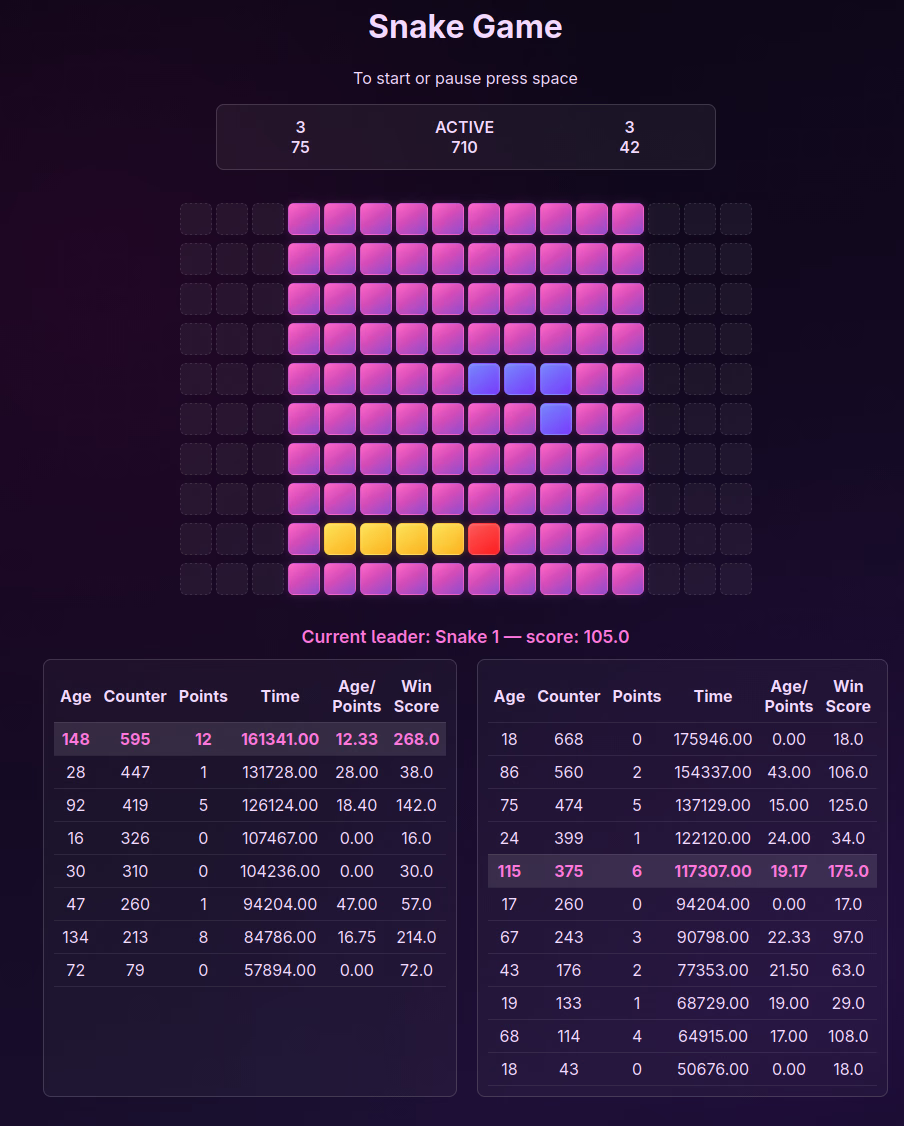
Building a classic Snake game in JavaScript is one of the most rewarding exercises for learning web development. It covers fundamental programming concepts: object-oriented design, array manipulation, event handling, game loop timing, state management, and component architecture.
In this comprehensive tutorial, we will build a Snake game from scratch and iteratively refactor it through three distinct stages:
- Part I: Objects & Movement – Setting up the project, rendering a grid map, creating the snake object, and handling directional movement.
- Part II: Game Logic & Events – Adding apples, collision detection (boundaries and self-collision), score tracking, pause states, and keyboard controls.
- Part III: Modernization with Vue.js & ES6 Modules – Refactoring the monolithic code into clean ES6 classes, integrating Vue.js components, setting up Webpack, and adding local 2-player support (Arrows vs. WSAD).
The full source code for all stages is available on GitHub (gustawdaniel/snake_js).
Part I: Objects, Map Generation & Movement
We start by building a minimal prototype. In this initial version, our goal is to render a map grid, draw a snake, and move the snake in a chosen direction across the grid.
1. Server Setup
We begin with a simple index.html file:
<!DOCTYPE html>
<html>
  <head>
    <title>Snake Game in JavaScript</title>
  </head>
  <body>
    <h1>Snake Game</h1>
  </body>
</html>
To serve the project locally, initialize a Node environment using pnpm:
pnpm initOur package.json file looks like this:
{
  "name": "2026",
  "version": "1.0.0",
  "description": "",
  "main": "index.js",
  "scripts": {
    "test": "echo \"Error: no test specified\" && exit 1"
  },
  "keywords": [],
  "author": "",
  "license": "ISC",
  "packageManager": "[email protected]"
}
To start the local development server:
npx viteOur page should be available at http://localhost:5173/.
2. Map Generation
Next, we add jQuery to assist with early DOM manipulation:
pnpm add jqueryWe update index.html to include a container #map and attach external CSS and JS files:
<!DOCTYPE html>
<html>
  <head>
    <title>Snake Game in JavaScript</title>
    <link rel="stylesheet" href="css/style.css" />
  </head>
  <body>
    <h1>Snake Game</h1>
    <hr />
    <h4>TODO:</h4>
    <ol>
      <li style="text-decoration: line-through">Add map</li>
      <li>Add snake</li>
      <li>Add events</li>
    </ol>
    <hr />
    <main>
      <div id="map"></div>
    </main>
    <script src="node_modules/jquery/dist/jquery.min.js"></script>
    <script src="js/app.js"></script>
  </body>
</html>
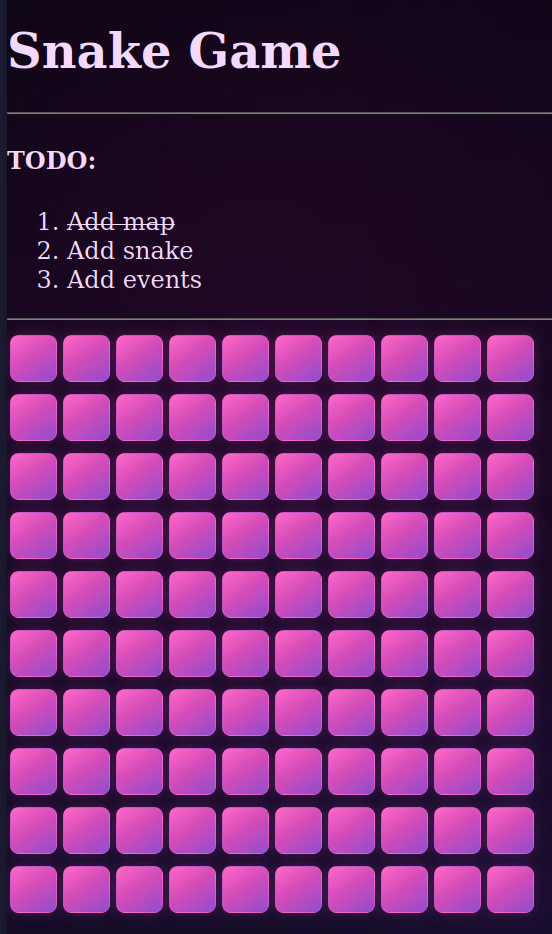
Now we create js/app.js. We encapsulate the logic inside an IIFE (Immediately Invoked Function Expression) and construct a grid of 10x10 rectangles:
(function () {
  const config = {
    mapWidth: 10,
    mapHeight: 10,
  };

  let map = {
    width: config.mapWidth,
    height: config.mapHeight,
    init: function () {
      let mapDiv = $("#map");
      mapDiv.empty();
      for (let i = 0; i < this.height; i++) {
        let rowDiv = $("<div>", { class: "row" });
        for (let j = 0; j < this.width; j++) {
          rowDiv.append(
            $("<div>", { class: "rect", "data-x": i, "data-y": j }),
          );
        }
        mapDiv.append(rowDiv);
      }
    },
  };

  map.init();
})();
Each grid cell is marked with HTML5 dataset attributes (data-x and data-y) corresponding to grid coordinates.
We style the grid cells and container in css/style.css. In addition to aesthetic gradients, we lock document scrolling so arrow key interactions during gameplay won’t cause the browser window to scroll or trigger unwanted gestures:
html, body {
  height: 100%;
  margin: 0;
  overflow: hidden; /* disable page scrolling */
  overscroll-behavior: none; /* prevent scroll chaining */
  -webkit-overflow-scrolling: touch;
  scrollbar-width: none; /* Firefox */
}

/* Hide natwive scrollbars (WebKit) */
html::-webkit-scrollbar,
body::-webkit-scrollbar {
  display: none;
}

body {
  background:
    radial-gradient(
      circle at 20% 20%,
      rgba(255, 0, 180, 0.08),
      transparent 35%
    ),
    radial-gradient(circle at 80% 70%, rgba(90, 0, 160, 0.12), transparent 45%),
    linear-gradient(160deg, #090612 0%, #12081f 35%, #1a1030 70%, #090b18 100%);
  color: #f3d9ff;
}

.rect {
  width: 30px;
  height: 30px;
  display: inline-block;
  margin: 2px;

  background: linear-gradient(145deg, #ff69c8 0%, #d44cb8 45%, #8f4dce 100%);

  border: 1px solid rgba(255, 120, 220, 0.25);
  border-radius: 6px;

  box-shadow:
    0 0 6px rgba(255, 70, 200, 0.18),
    0 0 14px rgba(170, 70, 255, 0.08);

  transition: all 0.2s ease;
}

.rect:hover {
  filter: brightness(1.15);
  box-shadow:
    0 0 10px rgba(255, 90, 220, 0.35),
    0 0 22px rgba(180, 80, 255, 0.18);
}
These viewport locking rules serve several critical purposes for interactive browser games:
- Prevent Gameplay Page Jumps:
overflow: hiddenprevents the browser page from jumping or scrolling vertically/horizontally when the user presses arrow keys (ArrowUp,ArrowDown). - Eliminate Mobile & Trackpad Gesture Artifacts:
overscroll-behavior: nonedisables browser overscroll effects (“rubber-banding”) and accidental pull-to-refresh triggers. - Seamless Fullscreen UI: Hiding scrollbars (
scrollbar-width: noneand::-webkit-scrollbar { display: none; }) ensures a clean, distraction-free arcade view across Firefox, Chrome, Safari, and Edge.
3. Rendering the Snake
To render a snake, we add snakeCss styles to config and define a snake object containing an array of segment coordinates:
const config = {
  mapWidth: 10,
  mapHeight: 10,
  snakeCss: {
    background:
      "linear-gradient(145deg, rgba(120, 136, 255, 0.99), rgba(120,60,255,.99))",
    border: "1px solid rgba(255,255,255,.08)",
    boxShadow:
      "inset 0 1px 2px rgba(255,255,255,.15), 0 0 8px rgba(255,60,220,.2)",
    borderRadius: "6px",
  },
};

let snake = {
  body: [
    { x: 5, y: 2 },
    { x: 4, y: 2 },
    { x: 3, y: 2 },
  ],
  draw: function () {
    this.body.forEach(function (part) {
      $(`div.rect[data-x="${part.x}"][data-y="${part.y}"]`).css(
        config.snakeCss,
      );
    });
  },
};

map.init();
snake.draw();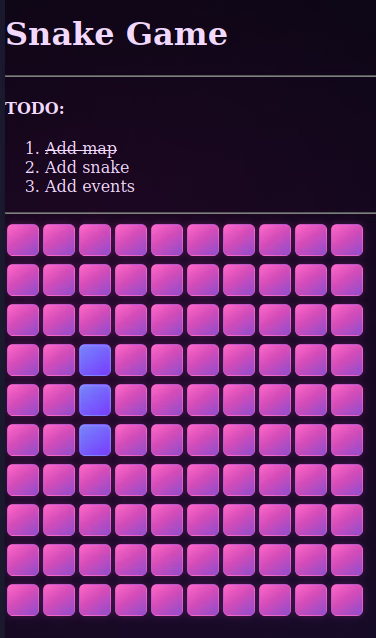
4. Basic Snake Movement
To make the snake move, we implement a move(direction) method. Moving forward means:
- Cloning the head segment and shifting its
(x, y)coordinate based on the direction. - Adding the new head to the front of the body array (
unshift). - Removing the last tail segment from the array (
pop) and resetting its style back tomapCss.
const config = {
  mapWidth: 10,
  mapHeight: 10,
  snakeCss: {
    background:
      "linear-gradient(145deg, rgba(120, 136, 255, 0.99), rgba(120,60,255,.99))",
    border: "1px solid rgba(255,255,255,.08)",
    boxShadow:
      "inset 0 1px 2px rgba(255,255,255,.15), 0 0 8px rgba(255,60,220,.2)",
    borderRadius: "6px",
  },
  mapCss: {
    background:
      "linear-gradient(145deg, #ff69c8 0%, #d44cb8 45%, #8f4dce 100%)",
    border: "1px solid rgba(255, 120, 220, 0.25)",
    boxShadow:
      "0 0 6px rgba(255, 70, 200, 0.18), 0 0 14px rgba(180, 80, 255, 0.08)",
    borderRadius: "6px",
  },
  roundTime: 1000,
};

let snake = {
  body: [
    { x: 5, y: 2 },
    { x: 4, y: 2 },
    { x: 3, y: 2 },
  ],
  draw: function () {
    this.body.forEach(function (part) {
      $(`div.rect[data-x="${part.x}"][data-y="${part.y}"]`).css(
        config.snakeCss,
      );
    });
  },
  move: function (direction) {
    let head = Object.assign({}, this.body[0]);

    switch (direction) {
      case "up":
        head.x = head.x - 1;
        break;
      case "down":
        head.x = head.x + 1;
        break;
      case "left":
        head.y = head.y - 1;
        break;
      case "right":
        head.y = head.y + 1;
        break;
    }

    this.body.unshift(head);
    $(`div.rect[data-x="${head.x}"][data-y="${head.y}"]`).css(config.snakeCss);

    let mapCoordinates = this.body.pop();
    $(
      `div.rect[data-x="${mapCoordinates.x}"][data-y="${mapCoordinates.y}"]`,
    ).css(config.mapCss);
  },
};

let game = {
  counter: 0,
  direction: "right",
  init: function () {
    map.init();
    snake.draw();
    setInterval(() => {
      this.counter++;
      $(".counter").text(this.counter);
      snake.move(this.direction);
    }, config.roundTime);

    document.addEventListener("keydown", (e) => {
      switch (e.key) {
        case "ArrowUp":
          this.direction = this.direction === "down" ? this.direction : "up";
          break;
        case "ArrowDown":
          this.direction = this.direction === "up" ? this.direction : "down";
          break;
        case "ArrowLeft":
          this.direction = this.direction === "right" ? this.direction : "left";
          break;
        case "ArrowRight":
          this.direction = this.direction === "left" ? this.direction : "right";
          break;
      }
    });
  },
};

game.init();
Part II: Game Logic, Apples, Collisions & Pause State
With basic movement working, we now implement actual game rules: spawning apples, detecting collisions, tracking scores, and adding a pause mechanism.
1. HTML Interface Update
First, we update index.html to include HUD elements for displaying the game state (PAUSED/ACTIVE), points score, turn counter, and game history list:
<!DOCTYPE html>
<html>
  <head>
    <title>Snake Game in JavaScript</title>
    <link rel="stylesheet" href="css/style.css" />
  </head>
  <body>
    <h1>Snake Game</h1>
    <div class="hud">
      <div>State: <span class="state">PAUSED</span></div>
      <div>Points: <span class="points">0</span></div>
      <div>Turns: <span class="counter">0</span></div>
    </div>
    <hr />
    <main>
      <div id="map"></div>
    </main>
    <h3>Game History</h3>
    <ul class="history"></ul>
    <script src="node_modules/jquery/dist/jquery.min.js"></script>
    <script src="js/app.js"></script>
  </body>
</html>
2. Spawning and Eating Apples
First, we extend config with appleCss styling for rendering apples:
config.appleCss = {
  background:
    "linear-gradient(145deg, rgba(255, 90, 90, 0.99), rgba(255, 30, 30, .99))",
  border: "1px solid rgba(255,255,255,.08)",
  boxShadow:
    "inset 0 1px 2px rgba(255,255,255,.15), 0 0 8px rgba(255, 60, 60, .4)",
  borderRadius: "6px",
};
Apples are generated randomly on the grid. To prevent an apple from spawning directly inside the snake’s body, we add addApple() and removeApple() helper methods to map. We also add mapDiv.empty() to map.init() so that re-initializing the board on game over clears old elements instead of duplicating grid rows:
let map = {
  width: config.mapWidth,
  height: config.mapHeight,
  apples: [],
  init: function () {
    let mapDiv = $("#map");
    mapDiv.empty(); // Clear existing grid to prevent grid duplication on reset
    for (let i = 0; i < this.height; i++) {
      let rowDiv = $("<div>", { class: "row" });
      for (let j = 0; j < this.width; j++) {
        rowDiv.append(
          $("<div>", { class: "rect", "data-x": i, "data-y": j }),
        );
      }
      mapDiv.append(rowDiv);
    }
  },
  addApple: function () {
    let apple = {
      x: Math.floor(Math.random() * this.width),
      y: Math.floor(Math.random() * this.height),
    };
    if (snake.containsCoordinates(apple)) {
      this.addApple(); // Retry if apple lands on snake
    } else {
      this.apples.push(apple);
      $(`div.rect[data-x="${apple.x}"][data-y="${apple.y}"]`).css(
        config.appleCss,
      );
    }
  },
  removeApple: function (toRemove) {
    this.apples = this.apples.filter((apple) => {
      return apple.x !== toRemove.x || apple.y !== toRemove.y;
    });
  },
};
When the snake moves onto an apple cell, we increment score points, remove the eaten apple, spawn a new apple, and skip removing the tail segment so the snake grows:
let snake = {
  points: 0,
  initialBody: [
    { x: 5, y: 2 },
    { x: 4, y: 2 },
    { x: 3, y: 2 },
  ],
  body: [],
  reset: function () {
    this.points = 0;
    $(".points").text(this.points);
    this.body = this.initialBody.map((part) => ({ ...part }));
  },
  containsCoordinates: function (inspected) {
    return this.body.some(
      (part) => part.x === inspected.x && part.y === inspected.y,
    );
  },
  draw: function () {
    this.body.forEach(function (part) {
      $(`div.rect[data-x="${part.x}"][data-y="${part.y}"]`).css(
        config.snakeCss,
      );
    });
  },
  eatApple: function () {
    if (
      map.apples.some(
        (apple) => apple.x === this.body[0].x && apple.y === this.body[0].y,
      )
    ) {
      this.points++;
      $(".points").text(this.points);
      map.removeApple(this.body[0]);
      map.addApple();
      return true;
    }
    return false;
  },
};
To initialize the board and spawn the initial apple on the grid when the game starts, we call map.addApple() alongside map.init() and snake.draw():
map.init();
snake.reset();
snake.draw();
map.addApple(); // Spawns the initial apple on the grid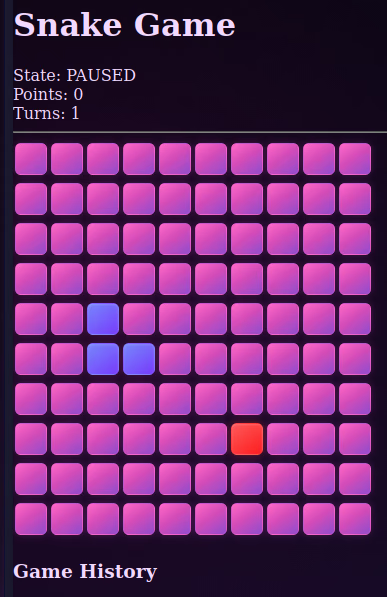
At this point, we have a working grid map with both the snake and a spawned apple. The snake moves across the board, but moving over an apple does not yet grow the snake or update score points, nor does hitting boundaries end the game. In the next section, we will implement collision detection, score tracking, and game over handling.
3. Collision Detection & Game Over Logic
The game ends under two conditions:
- The snake hits the edge of the map (
outOfMap). - The snake collides with its own body (
containsCoordinates).
We add outOfMap() method to map:
map.outOfMap = function (inspected) {
  return (
    inspected.x < 0 ||
    inspected.x >= this.width ||
    inspected.y < 0 ||
    inspected.y >= this.height
  );
};
We update snake.move() to trigger gameOver() if the head moves out of bounds or hits the snake’s body:
snake.move = function (direction) {
  let head = Object.assign({}, this.body[0]);

  switch (direction) {
    case "up":
      head.x = head.x - 1;
      break;
    case "down":
      head.x = head.x + 1;
      break;
    case "left":
      head.y = head.y - 1;
      break;
    case "right":
      head.y = head.y + 1;
      break;
  }

  if (map.outOfMap(head) || this.containsCoordinates(head)) {
    game.gameOver();
  } else {
    this.body.unshift(head);
    $(`div.rect[data-x="${head.x}"][data-y="${head.y}"]`).css(
      config.snakeCss,
    );
    if (!this.eatApple()) {
      let tail = this.body.pop();
      $(`div.rect[data-x="${tail.x}"][data-y="${tail.y}"]`).css(
        config.mapCss,
      );
    }
  }
};
4. Game Loop & State Control (game object)
We structure the game object to manage pause state ("paused" vs "active"), interval timing (setInterval), game over logging, and keyboard controls.
[!NOTE] Unlike Part I where the snake starts moving automatically when the page loads, Part II introduces a pause state (
state: "paused"). Whengame.init()runs, the game initializes in the PAUSED state. Pressing the SPACE bar toggles betweenPAUSEDandACTIVEto start or pause movement.
Pressing SPACE toggles the game between PAUSED and ACTIVE. Arrow keys set the movement direction:
let game = {
  counter: 0,
  direction: "right",
  state: "paused",
  timeout: undefined,
  run: function () {
    this.counter++;
    $(".counter").text(this.counter);
    snake.move(this.direction);
  },
  logResult: function () {
    $("ul.history").prepend(
      `<li>Time: ${performance.now().toFixed(2)}ms | Points: ${snake.points} | Turns: ${this.counter}</li>`,
    );
  },
  gameOver: function () {
    clearInterval(this.timeout);
    this.timeout = undefined;
    this.logResult();
    alert(`Game Over! Final Score: ${snake.points}`);
    this.reset();
  },
  reset: function () {
    this.counter = 0;
    this.direction = "right";
    this.state = "paused";
    $(".state").text(this.state.toUpperCase());
    $(".counter").text(this.counter);
    snake.reset();
    map.init();
    snake.draw();
    map.addApple();
  },
  setListeners: function () {
    document.addEventListener("keydown", (e) => {
      switch (e.key) {
        case "ArrowUp":
          this.direction =
            this.direction === "down" || this.state === "paused"
              ? this.direction
              : "up";
          break;
        case "ArrowDown":
          this.direction =
            this.direction === "up" || this.state === "paused"
              ? this.direction
              : "down";
          break;
        case "ArrowLeft":
          this.direction =
            this.direction === "right" || this.state === "paused"
              ? this.direction
              : "left";
          break;
        case "ArrowRight":
          this.direction =
            this.direction === "left" || this.state === "paused"
              ? this.direction
              : "right";
          break;
        case " ":
          if (this.state === "paused") {
            this.state = "active";
            $(".state").text(this.state.toUpperCase());
            this.timeout = setInterval(() => {
              this.run();
            }, config.roundTime);
          } else {
            this.state = "paused";
            $(".state").text(this.state.toUpperCase());
            clearInterval(this.timeout);
            this.timeout = undefined;
          }
          break;
      }
      if (
        [" ", "ArrowUp", "ArrowDown", "ArrowLeft", "ArrowRight"].includes(
          e.key,
        )
      ) {
        e.preventDefault();
      }
    });
  },
  init: function () {
    this.reset();
    this.setListeners();
  },
};

game.init();
5. Complete Part II Script (js/app.js)
Below is the complete, working code for Part II. Replacing js/app.js with this script provides full functionality:
(function () {
  const config = {
    mapWidth: 10,
    mapHeight: 10,
    roundTime: 200,
    snakeCss: {
      background:
        "linear-gradient(145deg, rgba(120, 136, 255, 0.99), rgba(120,60,255,.99))",
      border: "1px solid rgba(255,255,255,.08)",
      boxShadow:
        "inset 0 1px 2px rgba(255,255,255,.15), 0 0 8px rgba(255,60,220,.2)",
      borderRadius: "6px",
    },
    mapCss: {
      background:
        "linear-gradient(145deg, #ff69c8 0%, #d44cb8 45%, #8f4dce 100%)",
      border: "1px solid rgba(255, 120, 220, 0.25)",
      boxShadow:
        "0 0 6px rgba(255, 70, 200, 0.18), 0 0 14px rgba(180, 80, 255, 0.08)",
      borderRadius: "6px",
    },
    appleCss: {
      background:
        "linear-gradient(145deg, rgba(255, 90, 90, 0.99), rgba(255, 30, 30, .99))",
      border: "1px solid rgba(255,255,255,.08)",
      boxShadow:
        "inset 0 1px 2px rgba(255,255,255,.15), 0 0 8px rgba(255, 60, 60, .4)",
      borderRadius: "6px",
    },
  };

  let map = {
    width: config.mapWidth,
    height: config.mapHeight,
    apples: [],
    init: function () {
      let mapDiv = $("#map");
      mapDiv.empty();
      for (let i = 0; i < this.height; i++) {
        let rowDiv = $("<div>", { class: "row" });
        for (let j = 0; j < this.width; j++) {
          rowDiv.append(
            $("<div>", { class: "rect", "data-x": i, "data-y": j }),
          );
        }
        mapDiv.append(rowDiv);
      }
    },
    addApple: function () {
      let apple = {
        x: Math.floor(Math.random() * this.width),
        y: Math.floor(Math.random() * this.height),
      };
      if (snake.containsCoordinates(apple)) {
        this.addApple();
      } else {
        this.apples.push(apple);
        $(`div.rect[data-x="${apple.x}"][data-y="${apple.y}"]`).css(
          config.appleCss,
        );
      }
    },
    removeApple: function (toRemove) {
      this.apples = this.apples.filter(
        (apple) => apple.x !== toRemove.x || apple.y !== toRemove.y,
      );
    },
    outOfMap: function (inspected) {
      return (
        inspected.x < 0 ||
        inspected.x >= this.width ||
        inspected.y < 0 ||
        inspected.y >= this.height
      );
    },
  };

  let snake = {
    points: 0,
    initialBody: [
      { x: 5, y: 2 },
      { x: 4, y: 2 },
      { x: 3, y: 2 },
    ],
    body: [],
    reset: function () {
      this.points = 0;
      $(".points").text(this.points);
      this.body = this.initialBody.map((part) => ({ ...part }));
    },
    containsCoordinates: function (inspected) {
      return this.body.some(
        (part) => part.x === inspected.x && part.y === inspected.y,
      );
    },
    draw: function () {
      this.body.forEach(function (part) {
        $(`div.rect[data-x="${part.x}"][data-y="${part.y}"]`).css(
          config.snakeCss,
        );
      });
    },
    eatApple: function () {
      if (
        map.apples.some(
          (apple) => apple.x === this.body[0].x && apple.y === this.body[0].y,
        )
      ) {
        this.points++;
        $(".points").text(this.points);
        map.removeApple(this.body[0]);
        map.addApple();
        return true;
      }
      return false;
    },
    move: function (direction) {
      let head = Object.assign({}, this.body[0]);

      switch (direction) {
        case "up":
          head.x = head.x - 1;
          break;
        case "down":
          head.x = head.x + 1;
          break;
        case "left":
          head.y = head.y - 1;
          break;
        case "right":
          head.y = head.y + 1;
          break;
      }

      if (map.outOfMap(head) || this.containsCoordinates(head)) {
        game.gameOver();
      } else {
        this.body.unshift(head);
        $(`div.rect[data-x="${head.x}"][data-y="${head.y}"]`).css(
          config.snakeCss,
        );
        if (!this.eatApple()) {
          let tail = this.body.pop();
          $(`div.rect[data-x="${tail.x}"][data-y="${tail.y}"]`).css(
            config.mapCss,
          );
        }
      }
    },
  };

  let game = {
    counter: 0,
    direction: "right",
    state: "paused",
    timeout: undefined,
    run: function () {
      this.counter++;
      $(".counter").text(this.counter);
      snake.move(this.direction);
    },
    logResult: function () {
      $("ul.history").prepend(
        `<li>Time: ${performance.now().toFixed(2)}ms | Points: ${snake.points} | Turns: ${this.counter}</li>`,
      );
    },
    gameOver: function () {
      clearInterval(this.timeout);
      this.timeout = undefined;
      this.logResult();
      alert(`Game Over! Final Score: ${snake.points}`);
      this.reset();
    },
    reset: function () {
      this.counter = 0;
      this.direction = "right";
      this.state = "paused";
      $(".state").text(this.state.toUpperCase());
      $(".counter").text(this.counter);
      snake.reset();
      map.init();
      snake.draw();
      map.addApple();
    },
    setListeners: function () {
      document.addEventListener("keydown", (e) => {
        switch (e.key) {
          case "ArrowUp":
            this.direction =
              this.direction === "down" || this.state === "paused"
                ? this.direction
                : "up";
            break;
          case "ArrowDown":
            this.direction =
              this.direction === "up" || this.state === "paused"
                ? this.direction
                : "down";
            break;
          case "ArrowLeft":
            this.direction =
              this.direction === "right" || this.state === "paused"
                ? this.direction
                : "left";
            break;
          case "ArrowRight":
            this.direction =
              this.direction === "left" || this.state === "paused"
                ? this.direction
                : "right";
            break;
          case " ":
            if (this.state === "paused") {
              this.state = "active";
              $(".state").text(this.state.toUpperCase());
              this.timeout = setInterval(() => {
                this.run();
              }, config.roundTime);
            } else {
              this.state = "paused";
              $(".state").text(this.state.toUpperCase());
              clearInterval(this.timeout);
              this.timeout = undefined;
            }
            break;
        }
        if (
          [" ", "ArrowUp", "ArrowDown", "ArrowLeft", "ArrowRight"].includes(
            e.key,
          )
        ) {
          e.preventDefault();
        }
      });
    },
    init: function () {
      this.reset();
      this.setListeners();
    },
  };

  game.init();
})();
Part III: Modernization with Vue.js, ES6 Modules & 2-Player Support
In the final evolution of the project, we refactor the monolithic script into modular ES6 classes, integrate Vue.js for reactive rendering, set up Webpack, and introduce local 2-Player Multiplayer support.
1. Project Directory Structure
.
├── css/
│   └── style.css
├── index.html
├── package.json
├── README.md
├── src/
│   ├── App.vue
│   ├── main.js
│   ├── Event.js
│   ├── game/
│   │   ├── Board.js
│   │   ├── Config.js
│   │   ├── Game.js
│   │   └── Snake.js
│   └── components/
│       ├── Header.vue
│       ├── Main.vue
│       ├── Footer.vue
│       └── main/
│           ├── Board.vue
│           ├── Results.vue
│           └── State.vue
└── webpack.config.js
2. ES6 Game Domain Classes
Config Class (src/game/Config.js)
export default {
  mapWidth: 10,
  mapHeight: 10,
  roundTime: 200,
};
Snake Class (src/game/Snake.js)
Each snake is an instance capable of tracking its own score, position, direction, and independent collision status.
import config from "./Config";
import Board from "./Board";
import game from "./Game";

export default class Snake {
  constructor(index, body, direction) {
    this.index = index;
    this.points = 0;
    this.body = body;
    this.direction = direction;
    this.inGame = false;
    this.age = 0;
    this.initialConfig = {
      body: body.slice(),
      direction: direction,
    };
    this.logs = [];
  }

  init() {
    this.draw();
  }

  containsCoordinates(inspected) {
    return this.body.some(
      (part) => part.x === inspected.x && part.y === inspected.y,
    );
  }

  draw() {
    this.body.forEach((part) => {
      const el = document.querySelector(
        `div.rect[data-x="${part.x}"][data-y="${part.y}"]`,
      );
      if (el) el.classList.add(`snake-${this.index}`);
    });
  }

  move(direction) {
    let head = Object.assign({}, this.body[0]);
    switch (direction) {
      case "up":
        head.x -= 1;
        break;
      case "down":
        head.x += 1;
        break;
      case "left":
        head.y -= 1;
        break;
      case "right":
        head.y += 1;
        break;
    }

    if (
      Board.outOfExtendedMap(head) ||
      (this.inGame && (Board.outOfMap(head) || this.containsCoordinates(head)))
    ) {
      this.gameOver();
    } else {
      if (!this.inGame && !Board.outOfMap(head)) {
        this.inGame = true;
      }

      this.body.unshift(head);
      const headEl = document.querySelector(
        `div.rect[data-x="${head.x}"][data-y="${head.y}"]`,
      );
      if (headEl) headEl.classList.add(`snake-${this.index}`);

      if (!this.eatApple()) {
        let tail = this.body.pop();
        const tailEl = document.querySelector(
          `div.rect[data-x="${tail.x}"][data-y="${tail.y}"]`,
        );
        if (tailEl) tailEl.classList.remove(`snake-${this.index}`);
      }
    }
  }

  eatApple() {
    if (
      game.map.apples.some(
        (part) => part.x === this.body[0].x && part.y === this.body[0].y,
      )
    ) {
      this.points++;
      game.map.removeApple(this.body[0]);
      game.map.addApple();
      return true;
    }
    return false;
  }

  gameOver() {
    game.map.clearPositions(this.body);
    this.logResult();
    this.age = 0;
    this.points = 0;
    this.inGame = false;
    this.body = this.initialConfig.body.slice();
    this.direction = this.initialConfig.direction;
    this.draw();
  }

  logResult() {
    if (this.inGame) {
      this.logs.unshift({
        now: performance.now().toFixed(2),
        points: this.points,
        age: this.age,
        counter: game.counter,
      });
    }
  }
}
Board Class (src/game/Board.js)
The board handles map boundaries and multi-snake apple collisions:
import config from "./Config";
import game from "./Game";

export default class Board {
  constructor() {
    this.width = config.mapWidth;
    this.height = config.mapHeight;
    this.apples = [];
  }

  addApple() {
    let apple = {
      x: Math.floor(Math.random() * this.width),
      y: Math.floor(Math.random() * this.height),
    };
    if (
      game.snakes[0].containsCoordinates(apple) ||
      game.snakes[1].containsCoordinates(apple)
    ) {
      this.addApple();
    } else {
      this.apples.push(apple);
    }
  }

  removeApple(toRemove) {
    this.apples = this.apples.filter(
      (apple) => apple.x !== toRemove.x || apple.y !== toRemove.y,
    );
  }

  static outOfMap(inspected) {
    return (
      inspected.x < 0 ||
      inspected.x >= config.mapWidth ||
      inspected.y < 0 ||
      inspected.y >= config.mapHeight
    );
  }

  static outOfExtendedMap(inspected) {
    return (
      inspected.x < 0 ||
      inspected.x >= config.mapWidth ||
      inspected.y < -3 ||
      inspected.y >= config.mapHeight + 3
    );
  }

  clearPositions(positions) {
    positions.forEach((position) => {
      const el = document.querySelector(
        `div.rect[data-x="${position.x}"][data-y="${position.y}"]`,
      );
      if (el) {
        el.classList.remove("snake-0");
        el.classList.remove("snake-1");
      }
    });
  }

  init() {
    game.snakes[0].init();
    game.snakes[1].init();
    this.addApple();
  }
}
Game State (src/game/Game.js)
import Snake from "./Snake";
import Board from "./Board";

export default {
  counter: 0,
  timeout: undefined,
  snakes: [
    new Snake(0, [{ x: 9, y: -3 }], "up"),
    new Snake(1, [{ x: 0, y: 12 }], "down"),
  ],
  map: new Board(),
  state: "paused",
  run: function () {
    this.snakes[0].move(this.snakes[0].direction);
    this.snakes[1].move(this.snakes[1].direction);
  },
  init: function () {
    this.reset();
  },
  reset: function () {
    this.counter = 0;
    this.state = "paused";
    this.map.init();
  },
};
3. Vue Components & Event Handling
App Entry (src/main.js)
import Vue from "vue";
import App from "./App.vue";

new Vue({
  el: "#app",
  render: (h) => h(App),
});
Main View & 2-Player Controls (src/components/Main.vue)
Player 1 controls Snake 0 with the Arrow Keys, while Player 2 controls Snake 1 with WSAD:
<template>
  <main>
    <State></State>
    <Board></Board>
    <Results></Results>
  </main>
</template>

<script>
  import State from "./main/State.vue";
  import Board from "./main/Board.vue";
  import Results from "./main/Results.vue";
  import game from "../game/Game";
  import config from "../game/Config";

  export default {
    name: "Main",
    data() {
      return { game };
    },
    mounted() {
      game.init();
    },
    components: { State, Board, Results },
    created() {
      window.addEventListener("keydown", (e) => {
        // Player 1: Arrow Keys
        switch (e.key) {
          case "ArrowUp":
            game.snakes[0].direction =
              game.snakes[0].direction === "down" || game.state === "paused"
                ? game.snakes[0].direction
                : "up";
            break;
          case "ArrowDown":
            game.snakes[0].direction =
              game.snakes[0].direction === "up" || game.state === "paused"
                ? game.snakes[0].direction
                : "down";
            break;
          case "ArrowLeft":
            game.snakes[0].direction =
              game.snakes[0].direction === "right" || game.state === "paused"
                ? game.snakes[0].direction
                : "left";
            break;
          case "ArrowRight":
            game.snakes[0].direction =
              game.snakes[0].direction === "left" || game.state === "paused"
                ? game.snakes[0].direction
                : "right";
            break;

          // Player 2: WSAD
          case "w":
            game.snakes[1].direction =
              game.snakes[1].direction === "down" || game.state === "paused"
                ? game.snakes[1].direction
                : "up";
            break;
          case "s":
            game.snakes[1].direction =
              game.snakes[1].direction === "up" || game.state === "paused"
                ? game.snakes[1].direction
                : "down";
            break;
          case "a":
            game.snakes[1].direction =
              game.snakes[1].direction === "right" || game.state === "paused"
                ? game.snakes[1].direction
                : "left";
            break;
          case "d":
            game.snakes[1].direction =
              game.snakes[1].direction === "left" || game.state === "paused"
                ? game.snakes[1].direction
                : "right";
            break;

          // Global Pause / Resume
          case " ":
            if (game.state === "paused") {
              game.state = "active";
              game.timeout =
                game.timeout ||
                setInterval(() => {
                  game.counter++;
                  game.snakes.forEach((s) => s.age++);
                  game.run();
                }, config.roundTime);
            } else {
              game.state = "paused";
              clearInterval(game.timeout);
              game.timeout = undefined;
            }
            break;
        }
        if (
          [" ", "ArrowUp", "ArrowDown", "ArrowLeft", "ArrowRight"].includes(
            e.key,
          )
        ) {
          e.preventDefault();
        }
      });
    },
  };
</script>
Board Component (src/components/main/Board.vue)
<template>
  <div id="map" v-if="show">
    <div v-for="i in range('rows')" :key="i" class="row">
      <div
        v-for="j in range('cols')"
        :key="j"
        class="rect"
        :class="getRectClass(i, j)"
        :data-x="i"
        :data-y="j"
      ></div>
    </div>
  </div>
</template>

<script>
  import game from "../../game/Game";

  export default {
    name: "Board",
    data() {
      return { show: true, game };
    },
    methods: {
      getRectClass(i, j) {
        const classes = [];
        if (j < 0 || j >= 10) classes.push("out-map");
        if (this.game.snakes[0] && this.game.snakes[0].containsCoordinates({ x: i, y: j })) {
          classes.push("snake-0");
        }
        if (this.game.snakes[1] && this.game.snakes[1].containsCoordinates({ x: i, y: j })) {
          classes.push("snake-1");
        }
        if (this.game.map && this.game.map.apples.some((a) => a.x === i && a.y === j)) {
          classes.push("apple");
        }
        return classes;
      },
      range(direction) {
        if (direction === "rows") {
          return Array.from({ length: 10 }, (_, i) => i);
        } else if (direction === "cols") {
          return Array.from({ length: 16 }, (_, i) => i - 3);
        }
      },
    },
  };
</script>
4. Webpack Configuration
Our webpack.config.js uses vue-loader and babel-loader for bundling:
const path = require("path");
const webpack = require("webpack");

module.exports = {
  entry: "./src/main.js",
  output: {
    path: path.resolve(__dirname, "./dist"),
    publicPath: "/dist/",
    filename: "build.js",
  },
  module: {
    rules: [
      {
        test: /\.css$/,
        use: ["vue-style-loader", "css-loader"],
      },
      {
        test: /\.vue$/,
        loader: "vue-loader",
      },
      {
        test: /\.js$/,
        loader: "babel-loader",
        exclude: /node_modules/,
      },
      {
        test: /\.(png|jpg|gif|svg)$/,
        loader: "file-loader",
        options: { name: "[name].[ext]?[hash]" },
      },
    ],
  },
  resolve: {
    alias: { vue$: "vue/dist/vue.esm.js" },
    extensions: ["*", ".js", ".vue", ".json"],
  },
  devServer: {
    historyApiFallback: true,
    noInfo: true,
    overlay: true,
  },
  devtool: "#eval-source-map",
};
Summary & Next Steps
Over the course of this tutorial, we transitioned from a simple 20-line procedural DOM script into a structured, reactive, 2-player multiplayer arcade game:
- Object & DOM Fundamentals: We created an explicit grid representation and handled directional movements.
- Game Loops & State: We implemented random entity placement, collision handling, scoring, and non-blocking pause mechanisms.
- Architecture & Reactivity: We refactored code into clean ES6 classes (
Snake,Board,Game) and integrated Vue.js for declarative UI binding.
Check out the full repository on GitHub (gustawdaniel/snake_js).
Other articles
You can find interesting also.

How to configure SSL in local development
Setting up an https connection on the localhost domain can be challenging if you're doing it for the first time. This post is a very detailed tutorial with all the commands and screenshots.
Daniel Gustaw
• 12 min read
Data Structuring on the Example of CHF NBP Course
Learn how to write code that normalizes and structures data based on a case study in the field of finance.
Daniel Gustaw
• 27 min read
CodinGame: ASCI Art - Rust, NodeJs - Strings, Arrays, Loops
Solving this puzzle teaches how to manage strings and array arithmetics. You'll know how to split a string into separate parts and concatenate them into a new one. You can use indexes of arrays
Daniel Gustaw
• 9 min read